(DLC) Mass Effect is not found
Problem
Well, I didn’t know that Mass Effect (2007) had DLCs.
They are available for download just here.
However, after installation attempt I’ve got an error:
“Mass Effect is not found. Please reinstall the game from original source and try again.”
The root of problem
The root of the problem is that DLC installer checks installation by looking at windows registry keys. If they are missing, it throws an error.
Adding proper keys fixes the problem.
Fix
1. Go to regedit with WINEPREFIX set to game’s wine prefix.
Usually it is ~/.local/share/Steam/steamapps/compatdata/17460/pfx
WINEPREFIX=~/.local/share/Steam/steamapps/compatdata/17460/pfx regedit
OR
protontricks 17460 regedit
2. In regedit find HKEY_LOCAL_MACHINE -> Software -> Wow6432Node
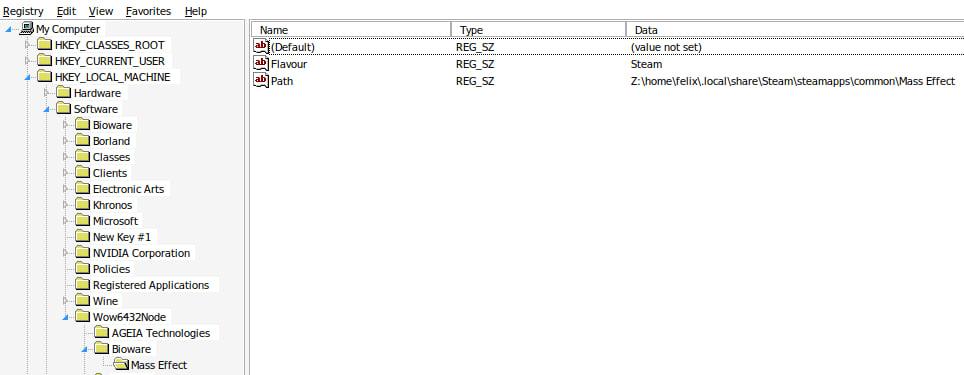
3. In Wow6432Node create Bioware key, inside Bioware key create Mass Effect key.
4. Add a string value to the key with name Flavour, double click on created value.
In the field “value data” write Steam.
5. Add a string value to the key with name Path, double click on created value.
Here we need to write path to our game using Windows style. It is a tricky part.
In my case game was in ~/.local/share/Steam/steamapps/common/Mass Effect/, regedit entry was:
Z:\home\felix\.local\share\Steam\steamapps\common\Mass Effect
How it should look like:
6. Next thing we need is to create another keys hierarchy:
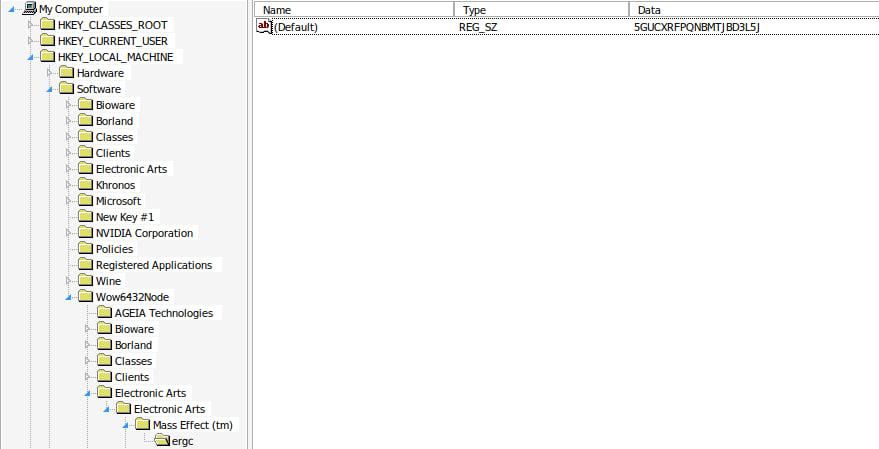
HKEY_LOCAL_MACHINE -> Software -> Wow6432Node -> Electronic Arts -> Electronic Arts -> Mass Effect (tm) -> ergc.
7. In ergc key set Default value to 5GUCXRFPQNBMTJBD3L5J
Screenshot:
8. After this you can run DLC installer:
WINEPREFIX=~/.local/share/Steam/steamapps/compatdata/17460/pfx \
wine \
/path/to/installer.exe
And that’s it!
Hope it will save someone’s time.